Find out whether a flat DXF is cut-ready before you send it.
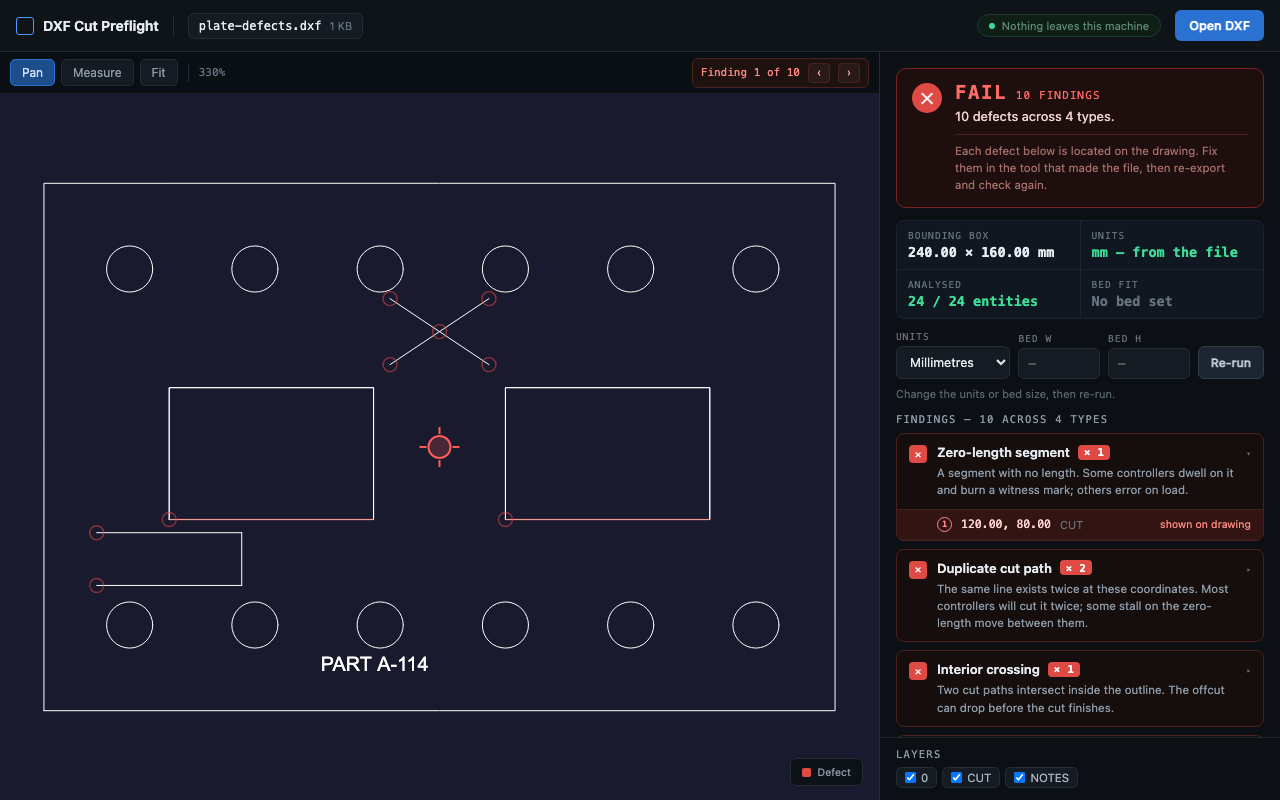
Open a DXF in Chrome and get a specific answer about its cut geometry: which contour is open, which segments are duplicated, whether the units are actually declared, whether it fits your bed. Free, local, and no permissions requested.
Free. No account, no sign-in, and no permissions requested. Your drawing is never uploaded.
Or check a DXF right here in your browser — no install, and the file is never uploaded.
The problem it solves
A flat cut file fails for boring reasons. A contour that looks closed is open by two thousandths of a millimetre. A line got pasted on top of another line, so the laser cuts the same edge twice. The drawing has no declared units, so one importer reads it as millimetres and another reads it as inches. None of this is visible by looking at the drawing — which is exactly why a viewer does not help.
These are the things fabricators publish rules about. SendCutSend states plainly that duplicate paths “will be rejected by our automated system since the laser cannot recognize or cut them”. Xometry’s DXF guide requires you to “close all open curves” and “remove all duplicate or overlapping lines, curves, points, or other entities”. You usually find out you broke one of these rules after the upload is rejected, or worse, after the material is cut.
What it checks
- Open contours. Cut paths whose endpoints do not actually meet, including gaps far too small to see.
- Duplicate and overlapping segments. Exact duplicates, partial overlaps, and segments that cross through each other.
- Zero-length entities. Degenerate segments that some CAM tools turn into a dwell mark or an error.
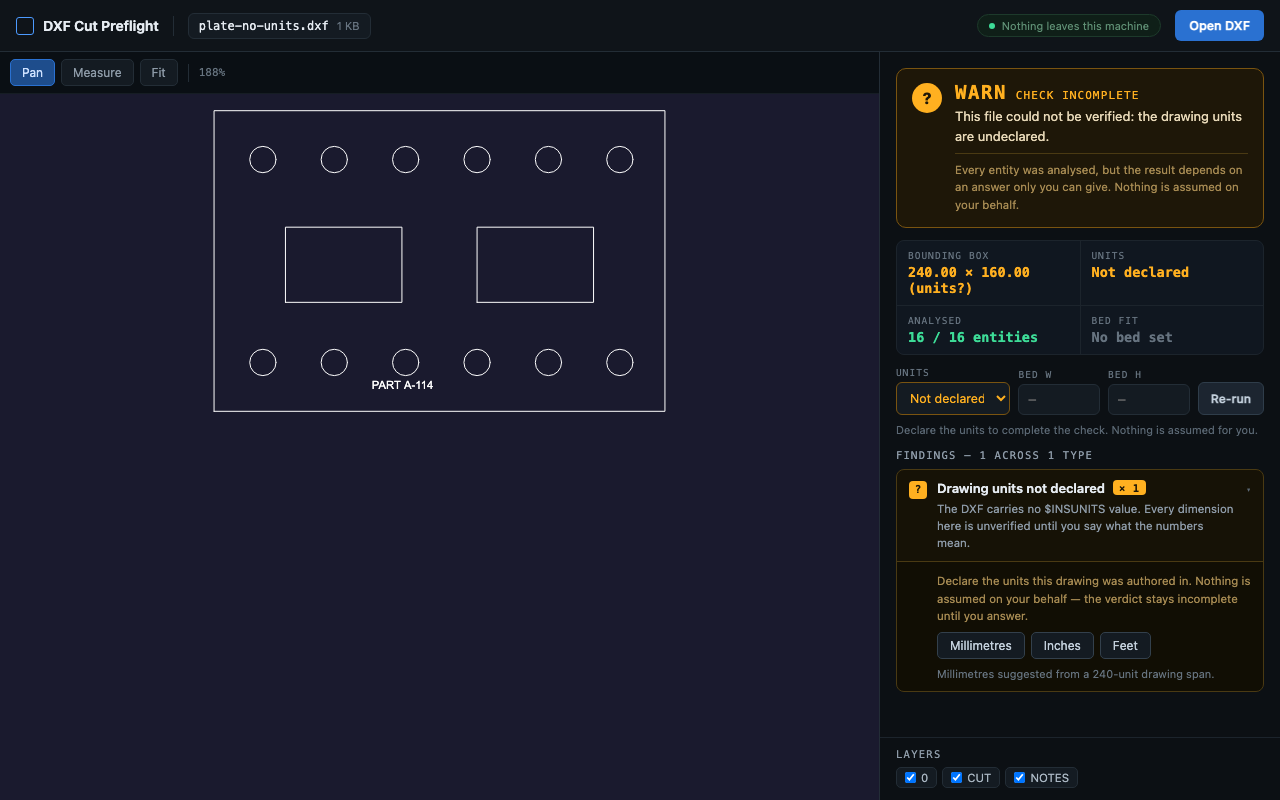
- Unit ambiguity. Whether the file actually declares its units in the header, rather than leaving the importer to guess.
- Bed fit. Whether the geometry fits inside a bed size you enter.
- Unsupported entities. Anything present in the file that the checker cannot analyse — reported by name and count, never quietly ignored.
Three verdicts, and one rule behind them
- PASS Every entity in the file was analysed and no cut-risk problem was found.
- WARN The check is incomplete. Units are undeclared, or the file contains geometry outside what the checker can analyse, or something needs a human decision.
- FAIL A specific cut-risk defect was detected, and the report names it.
The rule underneath: a file containing geometry the checker did not actually analyse can never come back PASS. If it meets an entity type it does not handle, it says so and downgrades to WARN. This is enforced in the code’s type system and covered by tests, not left to discipline. A false “ready to cut” costs someone real material, so the tool is built to refuse rather than reassure.
How well it works, stated honestly
On 16 clean flat-cut files generated from four laser-cut box designs at a range of sizes and material thicknesses, all 16 render correctly and earn a genuine PASS. Those same files were then deliberately damaged one defect at a time — an opened contour, a duplicated polyline, a partial overlap, a zero-length segment, geometry pushed past the bed, an unsupported entity type. All six were caught, each with the correct specific reason, and none produced a spurious extra finding.
Arbitrary production CAD is a different story: of 12 complex third-party drawings, only 3 rendered acceptably. That is the honest boundary of this tool. It is built for clean flat cut files, and it tells you when a file is outside that scope instead of guessing.
Privacy is a mechanism here, not a promise
The extension requests zero Chrome permissions — no host permissions, no storage, no tabs. It makes no network requests as part of its feature set, because it has no way to make them. Your file goes through a file input and is parsed in the page. There is no account, no sign-in, and no telemetry containing file data.
That matters if your drawings are customer parts, under NDA, or otherwise not yours to paste into a web service. Read the full privacy policy.
What it deliberately does not do
- No DWG. Not renamed DWG, not converted DWG. DXF only — ASCII, model space.
- No binary DXF, paper space, or external references.
- No editing and no repair. It tells you what is wrong; you fix it in the tool that made the file.
- Text is annotation, not geometry. TEXT and MTEXT are counted and listed, never treated as cut paths. Cut-out lettering has to be outlined geometry.
- It is not a substitute for your shop’s review. PASS means it passed the checks in scope, not that the part is correct, manufacturable, or priced.
Start here
- Before you upload a DXF: the 7-point preflight — the whole checklist, including the points no tool can check for you.
- Why your laser-cut DXF was rejected: open paths and duplicate lines
- DXF wrong size? Fix the 25.4× scale error
- How to remove duplicate lines from a DXF
- Why a DXF looks right in your design app but fails in CAM
- How to export a DXF from Fusion for laser cutting
- Looking for a DXF Viewer alternative? An honest comparison
Free. Opens ASCII, model-space DXF files. Requests no permissions.